
ZYWELL Thermal Barcode Label Printer: A Smart Solution for Small Businesses
, by RUBINA MANDVIA, 2 min reading time
, by RUBINA MANDVIA, 2 min reading time
Discover how the ZYWELL Thermal Barcode Label Printer helps small businesses, retailers, and online sellers organize inventory and print professional barcode labels without ink or toner.
Whether you run an online store, manage a warehouse, or operate a retail business, having a reliable label printer can make your daily operations easier. The ZYWELL Thermal Barcode Label Printer is designed to help businesses print professional-looking labels, organize inventory, and streamline order fulfillment.
Available at MSW Electronics, this compact printer is a practical addition to your business setup.
Traditional inkjet printers require ink or toner, which adds to operating costs. A direct thermal printer uses heat-sensitive labels instead, eliminating the need for ink cartridges or toner.
The ZYWELL printer offers several advantages:
Ink-free printing: Reduce the ongoing expense of ink and toner.
Professional barcode labels: Create clear labels for inventory, product identification, and retail operations.
Compact design: Its space-saving desktop design is suitable for offices, retail counters, and packing stations.
Simple operation: Designed for everyday business labeling tasks.
Versatile applications: Useful for product labels, barcodes, inventory management, and other compatible label formats.
E-commerce businesses
Organize orders and print compatible product and barcode labels for your Shopify, Amazon, Walmart, or other online store.
Retail stores
Label products and organize merchandise with barcodes for easier identification and inventory tracking.
Warehouses and stockrooms
Improve stock organization by creating consistent labels for products, storage bins, and inventory.
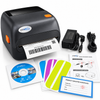
The pictured package includes the ZYWELL printer, power adapter, power cord, software disc, setup instructions, sample labels, and a product qualification certificate. Check the individual product listing for the exact contents of your package.
How to Get Started
Setting up your printer is straightforward. Connect the power supply, load compatible thermal labels, and install the appropriate printer driver or software using the manufacturer's instructions.
Once configured, you can create and print barcode labels suited to your business. Always verify label dimensions, connectivity, and software compatibility before purchasing.
From barcode scanners to thermal printers and other essential business accessories, MSW Electronics offers products to help businesses stay organized and work efficiently.
Explore our electronics and business equipment to find the right tools for your store, office, or warehouse.
Visit Shopmswelectronics.com today!